
Working with real-world JSON often means dealing with nested objects, arrays, and mixed value types. It’s readable for machines, but not always easy for humans — especially when you need a clean table you can search, analyze, or share.
That’s exactly what we built with TableFromJSON.com (TFJ):
a fast, browser-based way to convert JSON into readable tables and export them as a standalone HTML file.
- No accounts.
- No uploads.
- No data storage.
Just paste — convert — export.
Why nested JSON is hard to visualize
Take this example:
JSON{
"item_id": "INV-000001",
"name": "Wireless Tablet",
"location": {
"warehouse": "Regional Storage",
"aisle": "A12",
"shelf": "S3",
"bin": "B2"
},
"specifications": [
"Color: Black",
"Weight: 500g",
"Dimensions: 10x5x2cm"
]
}It looks fine in raw JSON, but if you need to search by warehouse or scan multiple items, it becomes messy fast. That’s the problem TFJ solves.
In-browser preview: nested JSON in one line
Inside TFJ’s main view, nested objects are displayed inline to keep the main table compact:
warehouse: Regional Storage, aisle: A12, shelf: S3, bin: B2
Arrays are shown as a single inline string:
Color: Black, Weight: 500g, Dimensions: 10x5x2cm
This lets you quickly scroll, scan, and compare values.
HTML export: nested data becomes mini tables
Here’s where TFJ does something different from other JSON converters:
Nested objects and arrays are turned into sub-tables inside the main table cell.
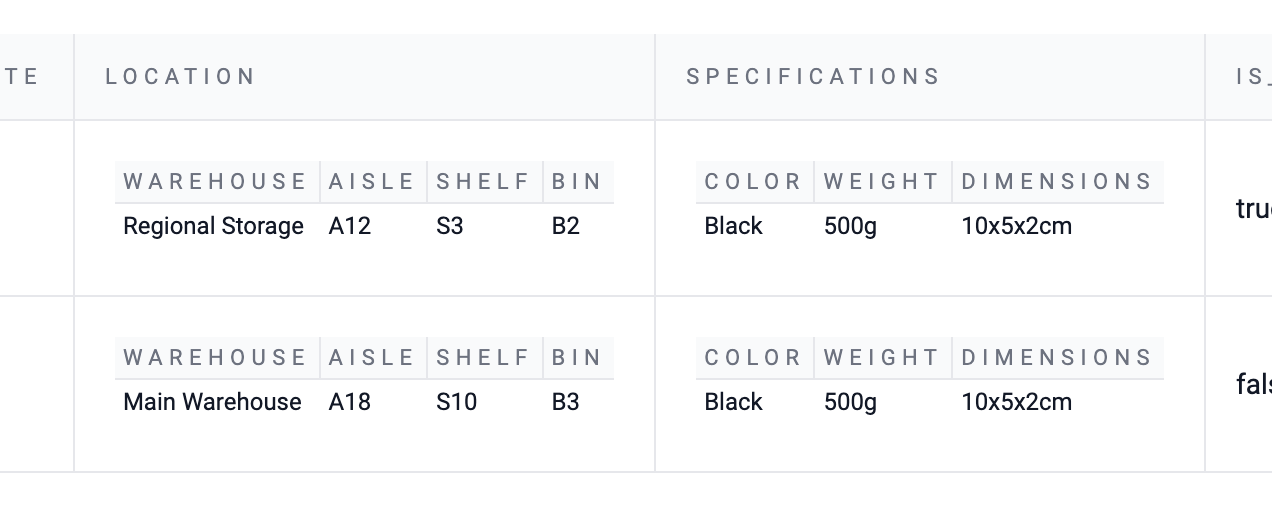
Searching works (sorting stays on the main table)
Inside the HTML export:
- You can search across the entire document (including nested headers and values)
- Sorting is applied to top-level table columns only
Nested mini tables usually contain:
- 1 header row
- 1 data row
So TFJ intentionally does not enable sorting inside nested tables — it wouldn’t be meaningful. This keeps the UI simple and predictable.
Privacy by design
A key principle in TFJ:
We never store your JSON. Everything happens in your browser.
This means:
- No server processing
- No data logging
- No upload history
- No account required
When you export to HTML, you create a local file that:
- opens in any browser
- is fully standalone
- contains your entire formatted dataset
- works even if TFJ is closed
Perfect for:
- internal reports
- sensitive inventory data
- compliance audits
- offline access
No “session expired” problems — it’s your copy, permanently.
Why HTML is better than CSV for nested JSON
CSV and Excel are great for flat data, but nested JSON becomes messy, especially with arrays or embedded objects.
HTML export keeps structure visible:
- group related attributes
- preserve hierarchy
- highlight relationships
- keep context intact
It’s like giving nested JSON a readable shape without preprocessing.
Try it with your own JSON
- Go to TableFromJSON.com
- Paste your JSON (nested structures welcome)
- Click Convert
- Preview inline display
- Export as HTML
- Search within your file
You’ll see mini tables appear exactly where your nested objects and arrays live.
Summary
TFJ is designed to make messy real-world JSON:
- readable
- searchable
- exportable
- private by default
HTML export keeps nested structure visible and useful, without server storage or complicated setup.
- Convert JSON to tables.
- Keep nested data readable.
- Export securely.